
宝塔部署 SurveyKing Pro
宝塔部署适合希望通过图形界面管理数据库、Java 服务和 Nginx 的团队。面板版本不同会导致按钮名称略有差异,但部署目录、端口和验证方法保持一致。
准备文件
surveyking-server.jar:后端程序。surveyking-pro.sql:数据库初始化脚本。survey-3.2-xxxx.zip前端交付包,解压后应包含dist/public和dist/admin;xxxx以实际文件名为准。- 版本随附的配置说明和 License。
建议将文件放到 /www/wwwroot/surveyking/:
/www/wwwroot/surveyking/
├── server/surveyking-server.jar
├── dist/public/
├── dist/admin/
├── config/application.yml
├── files/
└── logs/
1. 安装运行环境
按照宝塔官方说明安装面板,然后从软件商店安装:
- Nginx stable 版本。
- MySQL 5.7 或 8.0。
- Redis 6 或 7。
- Java 项目管理器和 Java 8 运行环境。
SurveyKing 后端是可独立运行的 Spring Boot JAR,不需要 Tomcat。使用宝塔的 JDK 管理功能或操作系统包管理器安装 Java 8。
MySQL、Redis 和后端端口不应暴露到公网。防火墙只开放站点使用的 HTTP/HTTPS 端口和必要的运维入口。
2. 创建并初始化数据库
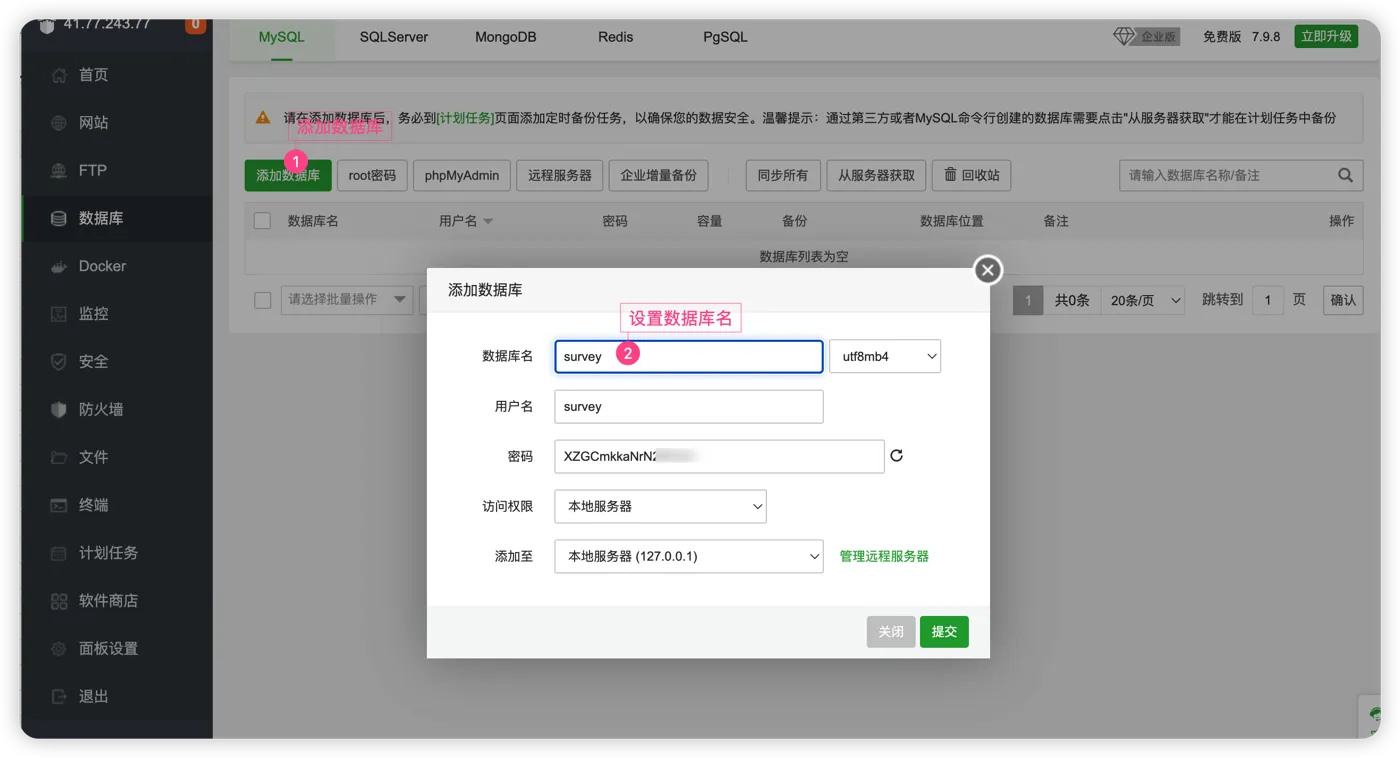
在 数据库 页面创建:
- 数据库名:
survey。 - 字符集:
utf8mb4。 - 用户:使用独立账号,不要让应用使用
root。 - 访问权限:后端与数据库在同一服务器时选择本地访问。
进入数据库管理页面,导入 surveyking-pro.sql。


完成标志: 数据库中已经生成 SurveyKing 业务表,导入过程没有报错。
3. 配置后端
创建 /www/wwwroot/surveyking/config/application.yml,只保存当前环境需要覆盖的配置:
server:
  port: 48080

spring:
  datasource:
    dynamic:
      datasource:
        master:
          name: survey
          url: jdbc:mysql://127.0.0.1:3306/survey?allowMultiQueries=true&useUnicode=true&useSSL=false&characterEncoding=UTF-8&serverTimezone=Asia/Shanghai&nullCatalogMeansCurrent=true
          username: surveyking
          password: '请替换为数据库密码'
  redis:
    host: 127.0.0.1
    port: 6379
    database: 0
    # Redis 未设置密码时删除下一行。
    password: '请替换为 Redis 密码'
在 Java 项目 中添加 Spring Boot 项目:
| 配置项 | 建议值 |
|---|---|
| JAR | /www/wwwroot/surveyking/server/surveyking-server.jar |
| Java | Java 8 |
| 端口 | 48080 |
| 运行用户 | 使用专用低权限用户,不使用 root |
| 启动参数 | 见下方 |
--spring.profiles.active=prod --spring.config.additional-location=optional:file:/www/wwwroot/surveyking/config/
不要把数据库或 Redis 密码写进启动命令;命令可能显示在进程列表和面板日志中。
启动后查看项目日志,确认不存在数据库、Redis、端口占用或 License 错误。
4. 创建前端站点
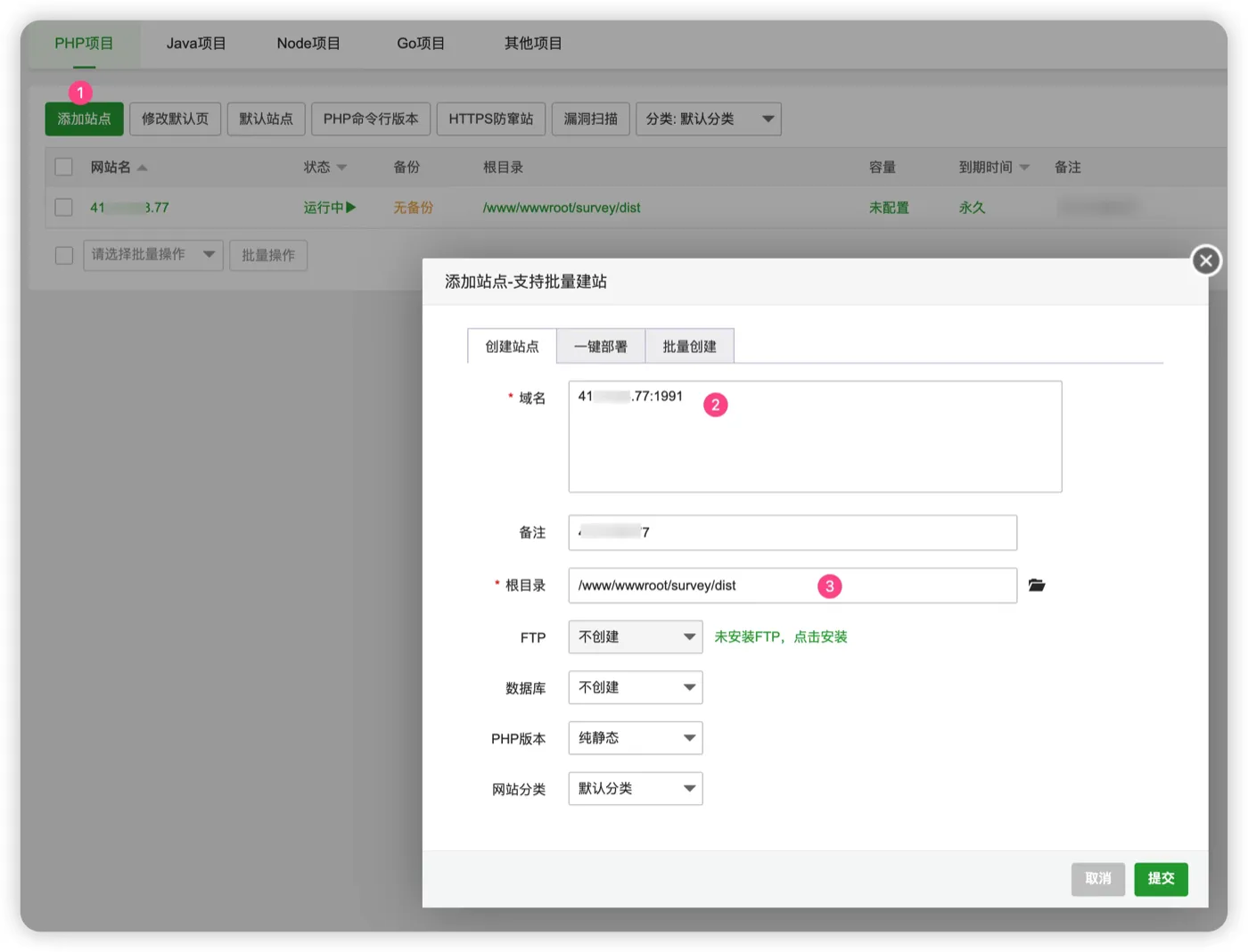
在 网站 页面创建站点:
- 域名:填写实际域名,不使用示例域名。
- 根目录:可先选择
/www/wwwroot/surveyking/dist/admin。 - PHP:选择纯静态。
- 数据库和 FTP:不需要创建。
打开站点的 Nginx 配置:
- 参考标准 Nginx 配置复制
server中的路由和代理规则。 - 将
/opt/surveyking/client/dist替换为/www/wwwroot/surveyking/dist。 - 保持后端地址为
127.0.0.1:48080。 - 将
map $http_upgrade ...放入 Nginx 主配置的http {},不要放入站点的server {}。 - 使用
nginx -t检查后再重载配置。
只需要代理 /admin-api 和 /captcha。如果把 / 整体代理到 Java 后端,前端静态资源和浏览器路由将无法正常工作。
HTTP 验证通过后,再通过宝塔为站点配置 HTTPS。HTTP 和 HTTPS 必须使用同一组前端路由与接口代理规则。
5. 验证部署
依次检查:
# 后端端口
ss -lntp | grep 48080

# Nginx 语法
nginx -t

# 两个前端入口
curl -I http://127.0.0.1/pub/index.html
curl -I http://127.0.0.1/adm/index.html

# Nginx 健康检查
curl http://127.0.0.1/health
然后使用普通账号完成登录、创建测试项目、提交答卷和上传文件。
6. 上线后配置
部署完成后登录管理后台完成系统初始化,再正式开放使用。
文件服务
若使用本地硬盘,打开 /infra/file/file-config(基础设置 → 文件管理 → 文件配置),选择“本地磁盘”,将“基础路径”设为 /www/wwwroot/surveyking/files,并授予 Java 项目运行用户读写权限。设置对外访问域名后,完成上传、预览和下载验证。
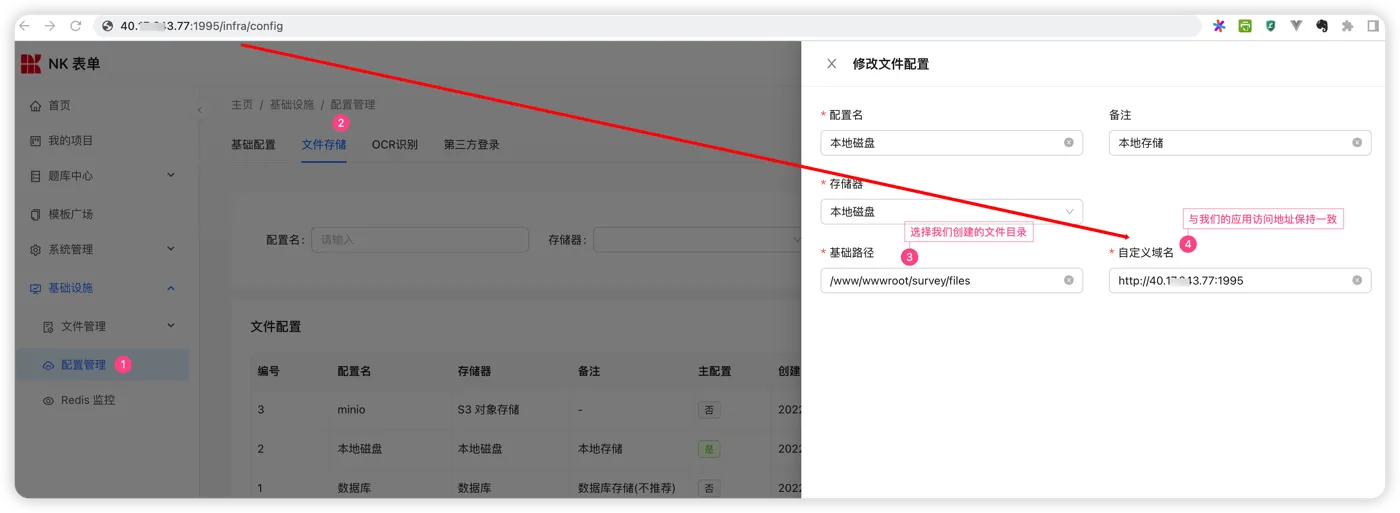
文件配置中的域名必须能被实际用户访问。内网部署不要填写 127.0.0.1 或只在服务器本机可用的地址。
可选集成
按业务需要配置微信公众号、企业微信、钉钉、邮件、短信和 OCR。每项集成都应使用普通用户完成一次授权或调用测试,再投入正式使用。
常见问题
Java 项目启动后立即停止
先查看 Java 项目日志,重点检查 Java 版本、数据库连接、Redis 密码、配置目录和 48080 端口占用。
管理后台可以打开,答题链接空白
检查 dist/public 是否完整,以及 /pub/、/e/、/s/、/t/、/q/、/share/、/redeem/ 和 /user/login 是否按标准配置返回 public 入口。
上传文件提示成功,但无法预览
检查文件目录权限、文件配置中的域名,以及 HTTPS 页面是否引用了 HTTP 文件地址。